XINGYING Installation Issues
1.Error prompt upon launching the software: The program cannot run because MSVCP100.dll is missing. Solution: MSVCP100.dll is a dynamic link library file of the VC 2010 Runtime Library. This error occurs due to the missing installation of the VC 2010 Runtime Library on your device. Download and install the corresponding runtime library to resolve the issue.
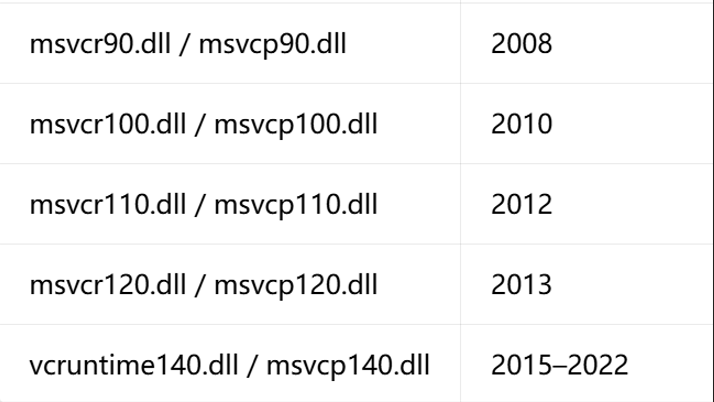
The table below shows the version correspondence for library files. You can identify the missing Visual C++ Redistributable version based on the last three digits of the DLL file name. Please install the corresponding runtime or the all-in-one runtime package. Download link: https://www.onlinedown.net/soft/1164015.htm
2.Error when launching the software: The code cannot be executed because wpcap.dll cannot be found. Solution: Install npcap-1.84.exe. Download link: https://npcap.com/dist/npcap-1.84.exe